TL;DR:
The Windows Event Logging Service contains a bug (use of uninitialized memory) that sometimes results in recently deleted (cleared) log entries being stored in other (unrelated) *.evtx journal files. This happens once a rarely-updated *.evtx journal file is cleared: it’s newly allocated and empty (i.e., containing zero log entries) ElfChnk area is filled with remnant data from memory of the event logging service, which may include “resurrected” log entries from other (recently cleared) journals. After the first log entry is allocated in that area, the remnant part is wiped: so, “resurrected” log entries are lost right after the first log entry is stored in that journal file — this is why the bug can be practically observed in rarely-updated journal files only.
In one DFIR case, I found that all C:\Windows\System32\winevt\logs\*.evtx journal files were cleared by intruders on multiple machines. When further examining *.evtx files collected from one of those machines, I noticed that the Microsoft-Windows-Application-Experience%4Program-Inventory.evtx journal file contains log entries coming from an unexpected event source: Microsoft-Windows-TerminalServices-LocalSessionManager! These strange entries were marked as unallocated (i.e., stored like deleted ones), although they can be easily extracted and parsed using the libevtx library, exposing everything I wanted to learn about incoming RDP connections to that machine…
The same situation was observed on other machines too: intruders cleared all *.evtx files on them, but RDP logs reappeared in completely unrelated journals as deleted entries!
I was able to reproduce this behavior, so here are my observations…
In a clean Windows 11 installation, I cleared the Microsoft-AppV-Client%4Operational.evtx journal file, then powered the machine off. I collected two disk images during this test: before clearing that journal (the before state) and after the final power off event (the after state).
Here are the key findings:
- The Microsoft-AppV-Client%4Operational.evtx file is described using the same file record in both states, before and after. It has the same Created timestamp. Its data occupies the same cluster number. This means that the file wasn’t deleted and created again when cleared (i.e., it’s the same file, only its data has changed).
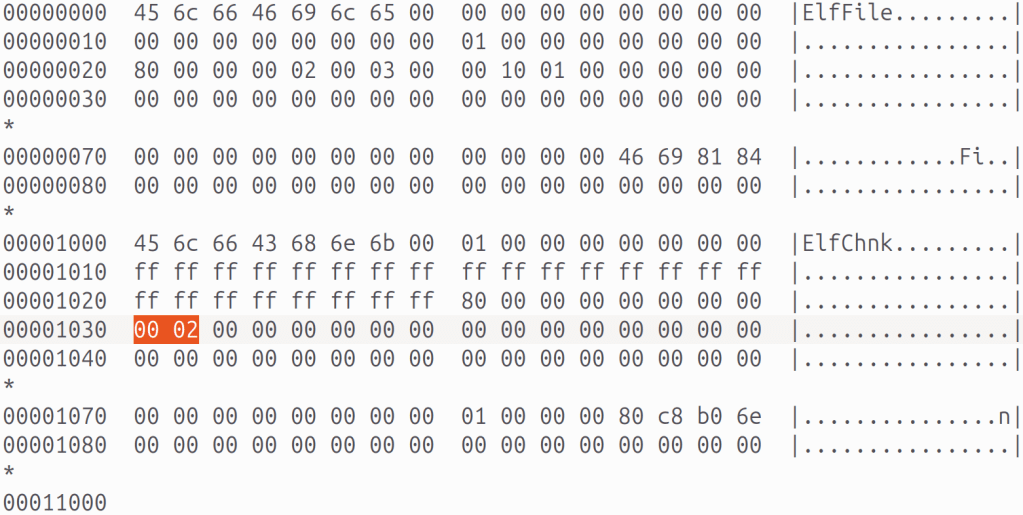
- In the before state, the file contains zero allocated log entries. The HEX dump of the data:
- In the after state, the file has this data (again, the file has no allocated log entries, but you can see some remnant data after the ElfChnk signature):
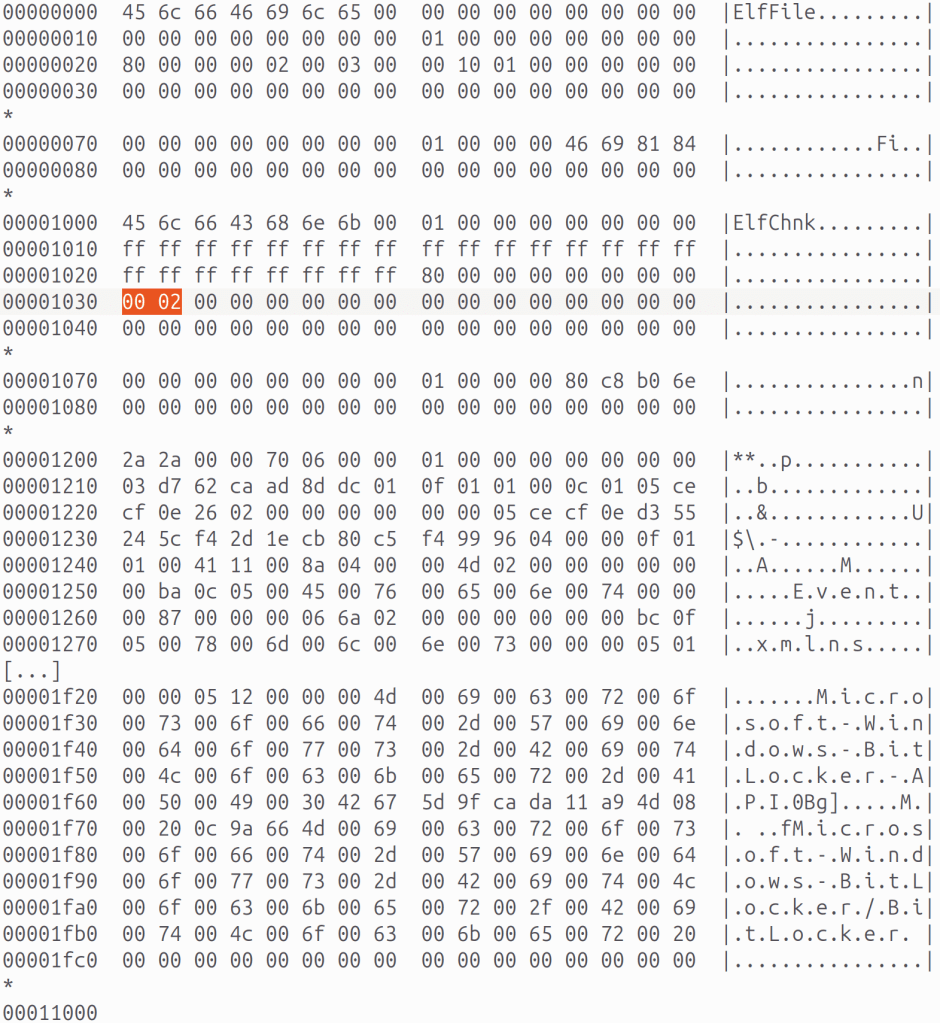
(Note: the value at 0x1030 bytes is the “Free space offset” field, it’s “00 02” or 0x200, remnant data starts at 0x1200 bytes.)
- The evtxexport tool gives the following output for that file:
$ evtxexport mnt/Windows/System32/winevt/Logs/Microsoft-AppV-Client%4Operational.evtxevtxexport 20181227No records to export.$ evtxexport -m all mnt/Windows/System32/winevt/Logs/Microsoft-AppV-Client%4Operational.evtxevtxexport 20181227Event number : 1Written time : Jan 25, 2026 03:50:47.860608300 UTCEvent level : Information (4)User security identifier : S-1-5-18Computer name : WIN-H8P4PBR8U4VSource name : Microsoft-Windows-BitLocker-APIEvent identifier : 0x0000032a (810)Number of strings : 0Event number : 2Written time : Jan 25, 2026 03:50:47.861420900 UTCEvent level : Information (4)User security identifier : S-1-5-18Computer name : WIN-H8P4PBR8U4VSource name : Microsoft-Windows-BitLocker-APIEvent identifier : 0x0000032a (810)Number of strings : 0Event number : 3Written time : Jan 25, 2026 03:50:47.886561600 UTCEvent level : Information (4)User security identifier : S-1-5-18Computer name : WIN-H8P4PBR8U4VSource name : Microsoft-Windows-BitLocker-APIEvent identifier : 0x0000032a (810)Number of strings : 0Event number : 4Written time : Jan 25, 2026 03:50:47.888014000 UTCEvent level : Information (4)User security identifier : S-1-5-18Computer name : WIN-H8P4PBR8U4VSource name : Microsoft-Windows-BitLocker-APIEvent identifier : 0x0000032a (810)Number of strings : 0Event number : 5Written time : Jan 25, 2026 03:50:47.927408900 UTCEvent level : Information (4)User security identifier : S-1-5-18Computer name : WIN-H8P4PBR8U4VSource name : Microsoft-Windows-BitLocker-APIEvent identifier : 0x0000032a (810)Number of strings : 0
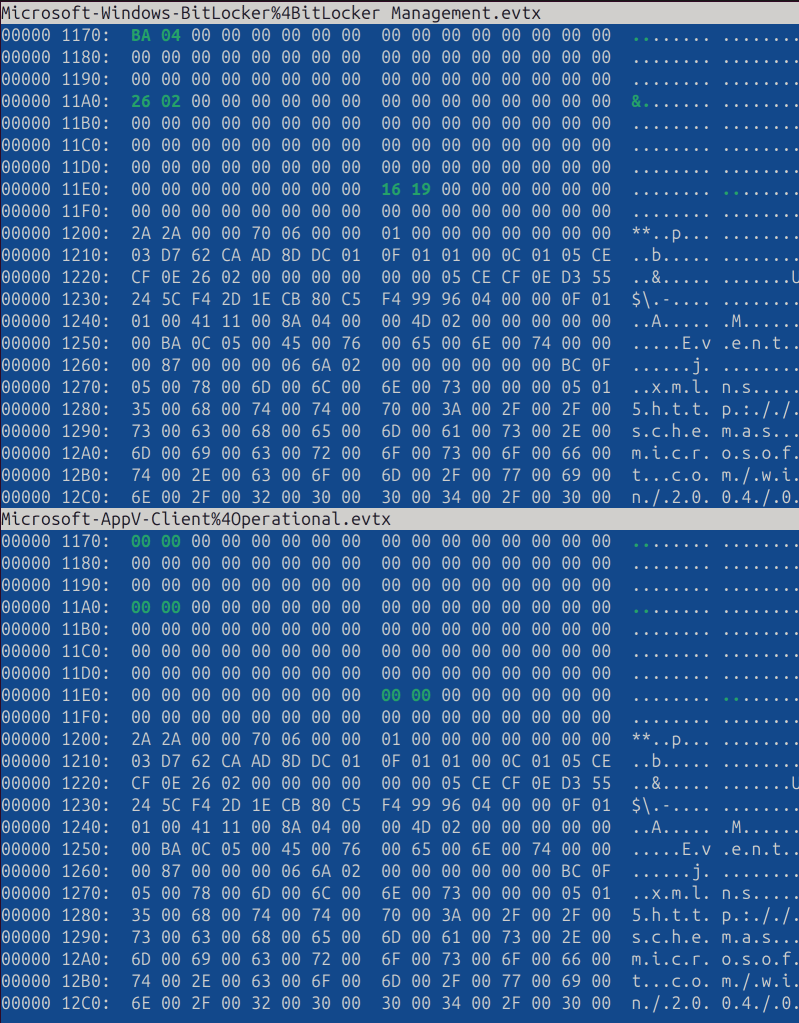
These entries, originating from Microsoft-Windows-BitLocker-API, match those actually stored in the C:\Windows\System32\winevt\Logs\Microsoft-Windows-BitLocker%4BitLocker Management.evtx file. The latter journal file was never touched during the test (i.e., it wasn’t cleared), but its contents were somehow copied to the Microsoft-AppV-Client%4Operational.evtx file…
Here is the difference between these two files, showing that data is identical starting from 0x1200 bytes (but the Microsoft-AppV-Client%4Operational.evtx file has less non-zero bytes):
Obviously, this is a memory safety bug, when uninitialized data is written to the drive. However, the bug doesn’t cross the security boundary, so it’s not a vulnerability (an unprivileged user can’t clear a custom journal file to obtain data from other, privileged journals).
According to my debugging results, the partially initialized ElfChnk chunk is coming from the File::MapInNewWriteChunk() function of the wevtsvc.dll library.
The sample *.evtx files (those mentioned in this post) can be downloaded here (both are taken from the after state):
- https://github.com/msuhanov/articles/raw/refs/heads/master/misc/Microsoft-AppV-Client%254Operational.evtx
- https://github.com/msuhanov/articles/raw/refs/heads/master/misc/Microsoft-Windows-BitLocker%254BitLocker%20Management.evtx
Conclusion
Always collect all *.evtx files! Always parse and examine all *.evtx files!

 My DFIR Blog
One thought on “Windows event logs were cleared, but resurrected in another file!”