Have you ever seen files like “Op-EXPLORER.EXE-03C49D11-000000F5.pf“?
TL;DR: these are operation-based prefetch files. An application can ask the NT kernel to record I/O traces for specific operations, either on a per-application or per-thread basis. Then, these traces will be used to prefetch file access requests for that application.
The idea behind prefetching is to load data before it’s actually needed. Typically, the NT kernel records I/O traces for an application during its startup phase. Starting from Windows 8, applications can request prefetching for their own I/O-bound operations.
To do so, an application should call the OperationStart() function before the I/O-bound operation begins. Then, after the I/O-bound operation finishes, the application should call the OperationEnd() function.
If there is no call to the OperationEnd() function within 10 seconds after the call to the OperationStart() function, the I/O trace is discarded by the NT kernel. (An application can ask the kernel to discard the trace through the call to the OperationEnd() function too.)
Additionally, there is an operation ID — an integer set by the caller to distinguish between I/O-bound operations (so the kernel would generate individual traces for each one, it’s up to a calling application to set this ID).
If there is an existing trace file for that application and that operation ID, it’s used to load (prefetch) the data from the drive (the actual I/O trace is then recorded as before).
Here is a blog post describing the operation-based prefetching in general: https://devblogs.microsoft.com/dotnet/asp-net-performance-prefetch-and-multi-core-jitting/.
Interestingly, there are two undocumented restrictions:
- No simultaneous traces for a single process are allowed. If a process is already being traced by the prefetcher component for another reason, the requested operation-based trace is going to be discarded.
- Operation-based traces containing almost zero I/O footprint aren’t recorded. No way to save a trace after a single file access operation.
A simple Python script to trigger the operation-based prefetch is here: https://gist.github.com/msuhanov/8636611d65b7d1aac4c2b00510fd10c1 (a long sleep in the beginning is required to skip over the startup-based prefetching).
And here is the test result (note the operation ID: 0x00373331):
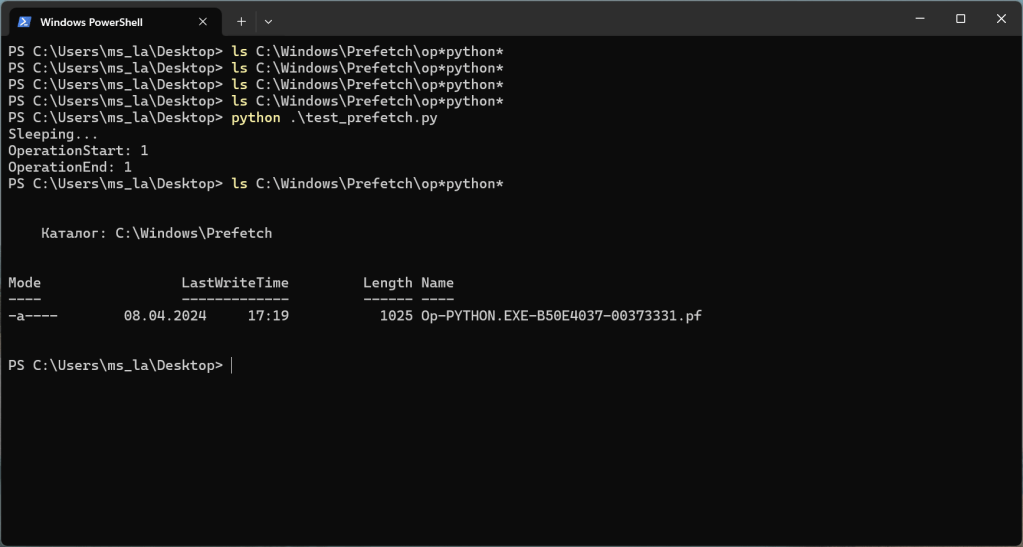
The “Op-PYTHON.EXE-B50E4037-00373331.pf” file contains this (parsed using libscca):
sccainfo 20200717

Windows Prefetch File (PF) information:
	Format version			: 30
	Prefetch hash			: 0x00373331
	Executable filename		: Op-PYTHON.EXE-B50E4037
	Run count			: 1
	Last run time: 1		: Apr 08, 2024 14:19:29.726549600 UTC
	Last run time: 2		: Not set (0)
	Last run time: 3		: Not set (0)
	Last run time: 4		: Not set (0)
	Last run time: 5		: Not set (0)
	Last run time: 6		: Not set (0)
	Last run time: 7		: Not set (0)
	Last run time: 8		: Not set (0)

Filenames:
	Number of filenames		: 12
	Filename: 1			: \VOLUME{01d9a58e012f4756-1601584d}\USERS\MS_LA\APPDATA\LOCAL\PROGRAMS\PYTHON\PYTHON312\DLLS\_CTYPES.PYD
	Filename: 2			: \VOLUME{01d9a58e012f4756-1601584d}\$MFT
	Filename: 3			: \VOLUME{01d9a58e012f4756-1601584d}\WINDOWS\SYSTEM.INI
	Filename: 4			: \VOLUME{01d9a58e012f4756-1601584d}\WINDOWS\SYSTEM32\ZIPCONTAINER.DLL
	Filename: 5			: \VOLUME{01d9a58e012f4756-1601584d}\WINDOWS\SYSTEM32\ZE_LOADER.DLL
	Filename: 6			: \VOLUME{01d9a58e012f4756-1601584d}\WINDOWS\SYSTEM32\XWIZARD.EXE
	Filename: 7			: \VOLUME{01d9a58e012f4756-1601584d}\WINDOWS\SYSTEM32\WPNCORE.DLL
	Filename: 8			: \VOLUME{01d9a58e012f4756-1601584d}\WINDOWS\SYSTEM32\WSOCK32.DLL
	Filename: 9			: \VOLUME{01d9a58e012f4756-1601584d}\WINDOWS\SYSTEM32\XPSPRINT.DLL
	Filename: 10			: \VOLUME{01d9a58e012f4756-1601584d}\WINDOWS\SYSTEM32\XOLEHLP.DLL
	Filename: 11			: \VOLUME{01d9a58e012f4756-1601584d}\WINDOWS\SYSTEM32\WWAPI.DLL
	Filename: 12			: \VOLUME{01d9a58e012f4756-1601584d}\WINDOWS\COMSETUP.LOG

Volumes:
	Number of volumes		: 1

Volume: 1 information:
	Device path			: \VOLUME{01d9a58e012f4756-1601584d}
	Creation time			: Jun 23, 2023 04:48:50.795503000 UTC
	Serial number			: 0x1601584d
Additionally, there are two small but fascinating findings:
- It seems that developers from Microsoft misused the STATUS_BUFFER_TOO_SMALL value (NTSTATUS). Its real meaning is “the buffer you provided is too small to hold the data you requested“, but here it’s used to state: “the number of events you recorded is too small to be written to a trace file“.
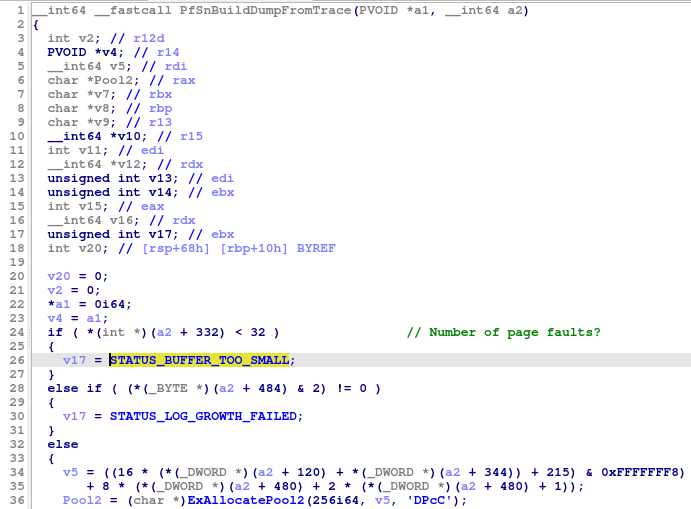
- The existing unofficial documentation is misleading in this case. It lists 5 as PrefetcherBootControl in the PrefetcherInformationClass. But the PfSnOperationProcess() function has nothing to do with the boot, it’s responsible for creating traces with names following this format string: “Op-%.17s-%08X“.

Perhaps, the same prefetch information class value was used for a different purpose in old versions of Windows.

 My DFIR Blog
2 thoughts on “Operation-based prefetching”