There are many CVE IDs assigned for various issues resulting in missing or improper Mark-of-the-Web (MOTW) propagation when extracting files from archives (#1, #2, #3, #4, #5, #6, and so on).
Some of these issues are disputed using the same template (inserted by MITRE):
- Mark-of-the-Web propagation can increase risk via security-warning habituation – in other words, users are tired of such warnings;
- the intended control sphere for file-origin metadata (e.g., HostUrl in Zone.Identifier) may be narrower than that for reading the file’s content – simply propagating the “Zone.Identifier” alternative data stream isn’t enough to adhere a possible security policy, although I haven’t seen any real-world examples of this not being enough, security policies (not to be confused with hunting rules) aren’t bound to fields other than “ZoneId”.
Microsoft treats MOTW in their software as a defense-in-depth feature which isn’t serviceable. Although bypasses observed in-the-wild get CVE IDs (e.g., CVE-2024-38217).
As a result, I’m not sure if MOTW is a security boundary, but here is another big issue…
In 2022, Microsoft changed the rules and its software started propagating MOTW to container files (like VHD/VHDX/ISO images easily mountable through a double-click on desktop systems):
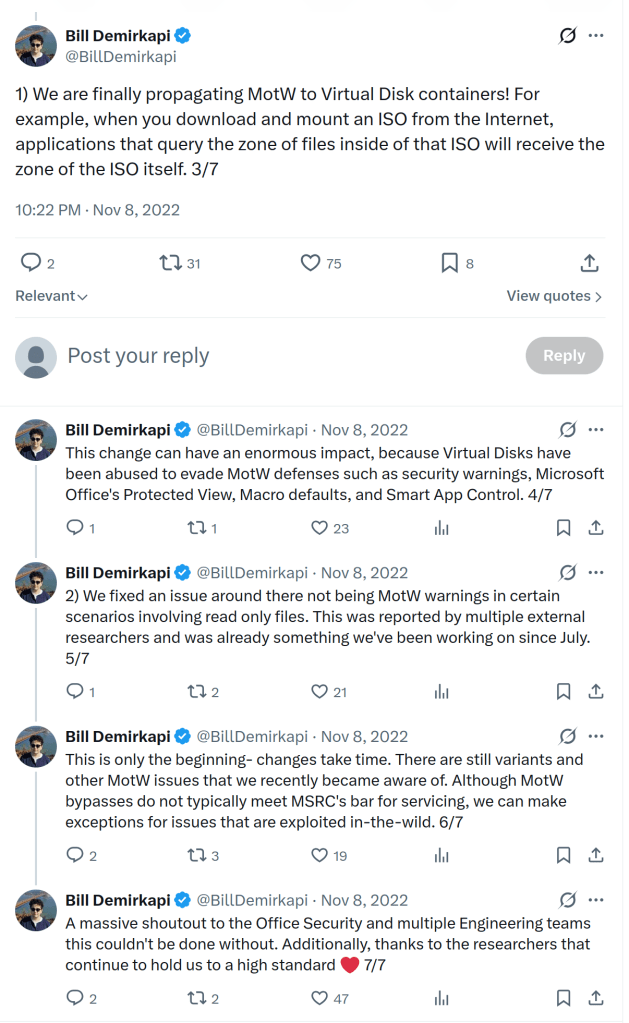
(Source.)
Now, if you extract an archive from a mounted container using Windows Explorer, MOTW is propagated to the extracted files. Or not?
Let’s take a look at the “BAT-in-ZIP-in-VHDX” case. A user downloads a VHDX file, mounts it (through double-clicking), opens a ZIP file inside the mount point (the E: drive in the test cases below), then extracts a BAT file (from that ZIP archive) to the Desktop folder.

When using Windows Explorer, it checks for the “Zone.Identifier” alternative data stream within the mount point (E:\test.zip:Zone.Identifier), doesn’t find it, and then fires the same check against the container file (VHDX). The extracted BAT file will have the “Zone.Identifier” alternative data stream present (so, MOTW is propagated properly from the container file, despite the archive within the container having no MOTW present).
But when using WinRAR (version 7.22), the “Zone.Identifier” check is performed against the ZIP file in the mount point only! The tool doesn’t go beyond the mount point to check if the disk image file has that mark set. So, MOTW is lost (this is a classic/well-documented pre-2022 MOTW bypass that still occurs).

So, what’s wrong?
Microsoft changed the under-the-hood rules of the MOTW propagation. These changes were implemented in their own software (like Windows Explorer and its supporting libraries), but third-party tools (like WinRAR) don’t follow the new rule.
The old rule was: simply check if the archive file has the Zone.Identifier stream set. The new rule extends: if it doesn’t, go to the container file and check if it has the Zone.Identifier stream set.
Obviously, there was no other way to implement this: you can’t assign alternative data streams to files in read-only file systems and in file systems that don’t support such a concept (like FAT32). You can do that with NTFS mounted as read-write but malware campaigns would simply switch to FAT32 in that case. Microsoft decided to propagate MOTW into mounted containers, but in fact they don’t do that at all… Instead, they adjusted the logic implemented in their software.
In the decompiled code below (from urlmon.dll), the CZoneIdentifier::Load() function actually checks the “Zone.Identifier” stream (loads and parses it). If there is no “Zone.Identifier” found, the function does the same check against the container file found via the GetParentDriveOfVirtualDrive() call. This function calls the GetStorageDependencyInformation() function from virtdisk.dll to obtain the information about the container file (like the VHDX file above).

Compare this to an old (pre-2022) version of the same library:

So, my question is: do we need to follow this new undocumented MOTW propagation rule?
If yes, feel free to get a bunch of CVE IDs for software that doesn’t follow it. Because most third-party tools ignore fifty percent (1 out of 2 to be precise) of the current MOTW checks.
If no, then why do we sometimes treat the missing MOTW propagation as a security hole? Missing container checks are a hole too.
Or something else?
Third-party software won’t magically pick the new check, so WinRAR, 7-Zip, and many other tools don’t propagate MOTW in the same way as Windows Explorer. That change from 2022 doesn’t affect third-party code.


One thought on “Mark-of-the-Web: the rules changed, the tools didn’t”